- Year
- 2026
- Contribution
- End to end design (Solo)
- Industry
- Private home alarm · Smart Home
Building an in-app self-service channel
I designed a self-service battery replacement journey that improved customer experience while saving money and reducing churn for Sector Alarm.
Problem
A Sector Alarm system consists of various sensors such as motion and smoke detectors. Each is powered by a disposable battery. When the battery is low, it has to be replaced - either by the user or a technician. The company sends replacements by mail along with SMS reminders.
When a customer doesn't replace a low battery themselves, Sector Alarm has to send a technician to their home to do it. The customer pays for the visit and Sector Alarm still loses money. Half of customers don't replace batteries themselves in time, compromising their security.
The biggest obstacle to replacing batteries is perceived complexity of the task - sensors have to be taken off their mounts, sometimes high next to the ceiling. Also, some people are just not comfortable messing around with alarm system sensors. On the positive side - when asked about their experience after replacing the batteries, most find it quite easy. When asked what convinced them to replace the batteries, users cited SMS reminders.
Opportunity
We knew that nudges and reminders work. We could use the app to more effectively remind and to guide them through the process and provide instant feedback.
Potential upside - every time a user replaces batteries themselves no technician needs to be sent to customer's home to do it. Good guidance can also decrease contacts to customer support. Our initial aim was to lift the replacement rate from 50% to 60% (v1).
Approach
Our hypothesis was that nudging users with notifications and in-app banners was our best bet to affect the replacement rate. The risk was that nudging too hard could annoy users (which would reflect in falling CSAT) so the hard part was finding a balance between a sense of urgency and a calm "everything is under control" feeling.
Discovery
To get a holistic understanding of the existing process I interviewed stakeholders responsible for it and country managers in local markets. Then I conducted a survey of our customers who had replaced batteries themselves. I also benchmarked similar services in the smart home industry.
The current process was complex - multi-department and country-wide service, with several technical and business-process dependencies, so we couldn't completely rebuild it straight away. I decided to create a vision for how the service should look in the long run, with all the bells and whistles that we could build towards.
[Image — vision board]
Design
The best ways to communicate about low batteries were in-app and push notifications. In the app itself we had three types of message: blue, yellow and red. Blue was the lowest priority, yellow and red the higher ones.
[Image — the three message types (blue / yellow / red)]
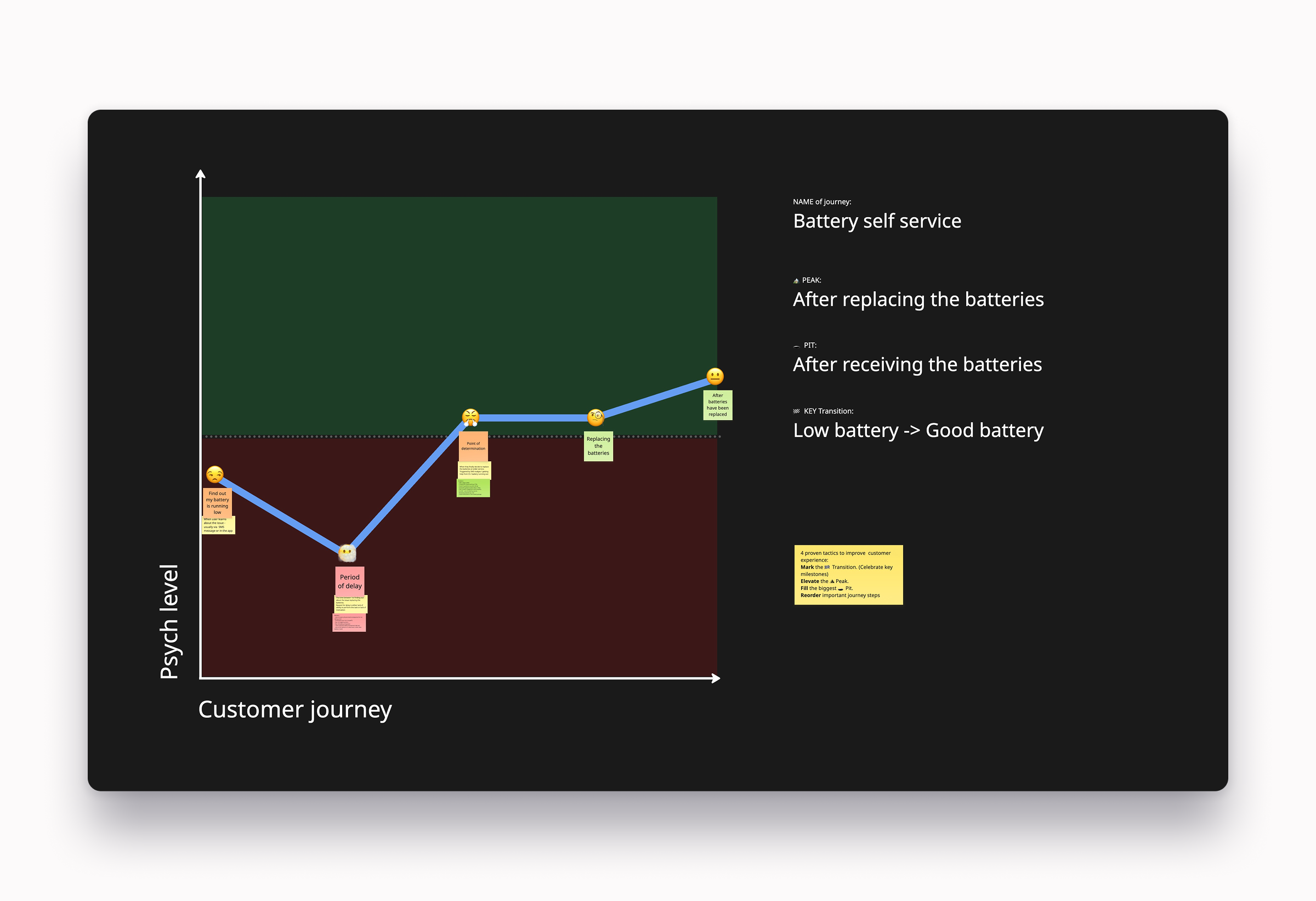
I decided to use blue style on the 1st notification - 1 day after replacement batteries are sent, and then red on days 7 and 14, when we knew the package would have reached users' homes. We considered using yellow messages on day 7 and then escalating to red, but decided to go red straight away in order to communicate that replacing batteries is an urgent and important task.
[Image — user journey map with explanation]
Guidance design
In discovery I identified that one of the biggest blockers for replacing the batteries was difficulty in locating the sensor and fear of breaking it. To address this I created "Battery replacement guide" view. In the guide, the user can see exactly where the sensor is located in their home and videos on how to dismount sensors and replace the batteries inside. To address the fear of not doing it correctly I added visual feedback in the app once the sensor is back in place.
[Image — sensor in restored state]
What shipped
[Image 1]
Day 1: first notification – blue, dismissible. Tells the user that batteries need replacing and that replacements are on the way by mail.
[Image 2]
Day 7: escalates to red and can't be dismissed – it stays on the home screen until the batteries are replaced or the day 14 reminder replaces it.
[Image 3]
Battery replacement guide – which sensors need new batteries and where they are, confirmation that replacements have been sent, and video instructions. Once the sensor is back on its bracket, the app confirms the replacement worked.
[Image 4]
Low battery reminders on other pages in the app.
After release
Numbers
In the first three months after shipping version 1, we seem to have reached our goal - replacement rate increased from 50% to 60%. According to Customer Support, the volume of customer support requests related to battery replacement decreased by around 30% in the same period.
Reflection
A big challenge while working on this feature was not being able to get feedback about the effectiveness of the design from users. This journey is closely related to the long-term experience of owning the alarm system, so testing it as a simple online prototype would not have given us real insights. To properly test this, we needed to be with a customer during the battery change or at least interview them after the fact. Because of concerns about annoying users who already had low engagement with the product, we decided not to ask for feedback from users who hadn't replaced batteries themselves, only from ones who had. We had to assume that users who replace themselves had similar mental models to ones who don't. If I started from scratch, I would push to engage the passive users.